
Content Check
Review Every Shoot in 30 Seconds | Mac App

Stop scrolling through hours of video and photos to find out whether today's shoot actually worked. Content Check watches your shoot folders, picks up every new production automatically, and turns photos and video frames into a clean, shareable PDF – so you can review a full day of footage in 30 seconds and know everything is in the box.
Built for photographers, videographers, content creators, and production agencies who shoot a lot and want to stop wasting time on review and handover.
App Screenshots


FEATURES
Folder Monitoring
Set a watch folder – Content Check picks up every new shoot automatically. No manual work, no missed productions.
PDF Reports
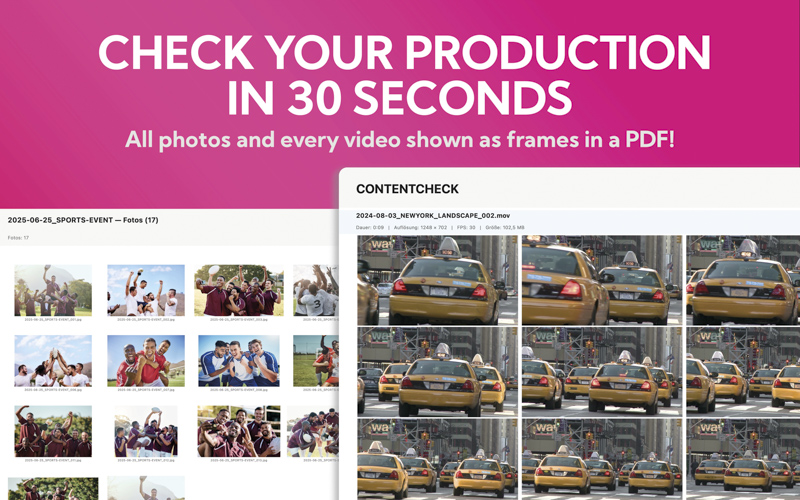
Every production becomes a professional PDF with photo previews, video frames, and file statistics – ready to share with team or client.
Video Frames
Every video condensed into a frame grid. Spot mistakes in seconds, without ever opening Premiere or Resolve.
Email Delivery
Automatic SMTP delivery with CC/BCC, custom intro text, and your own signature – the PDF lands in the right inbox while you're still packing up.
Custom Branding
Your logo, your title, your copyright. Every PDF looks like it came straight from your studio.
Schedule
Pick your days, pick your time. Content Check runs in the background and delivers reports while you shoot.
Menu Bar
Status, schedule, and quick actions live in the macOS menu bar – no window to open, no workflow to interrupt.
Free to try – one-time unlock
Download Content Check for free and run the full app on 5 productions – no limits, no watermark, no feature lock. Test it on real shoots and decide afterwards. The full version is unlocked with a single in-app purchase. One time, lifetime use. No subscription.
FAQ
What file types does Content Check support?
Photos: JPEG, PNG, HEIC, TIFF, BMP, GIF, WebP, DNG, RAW, ARW, CR2, CR3, NEF, NRW, ORF, RW2, RAF, PEF, SRW. Videos: MP4, MOV, M4V, AVI, MKV, WMV, MTS, M2TS. RAW formats are processed via macOS-native CGImageSource using the embedded JPEG preview. Proprietary codecs like RED RAW (R3D), Blackmagic RAW (BRAW), and MXF are not supported natively – these are flagged in the protocol. RED Proxies are supported.
Does it work with network drives?
Yes. Any mounted volume or folder accessible through Finder can be used as a watch folder – perfect for studios with shared NAS or production servers.
Can I customise the PDF layout?
You can set your own title, logo, copyright, and add notes to the cover page. The layout itself is optimised for fast, clear review – every photo and every video frame visible at a glance.
How does the email delivery work?
Content Check sends PDFs directly via your own SMTP server. Configure recipient, CC/BCC, intro text, and signature in Settings – one PDF per shoot or all PDFs collected in a single mail.
Is it available in languages other than English?
Yes. Content Check is fully available in German and English. The language follows your macOS system setting.
What does it cost?
The app is free to download and runs the full feature set for 5 productions. After that, you unlock the full version with a single one-time in-app purchase. No subscription, no recurring fees.
